

Description
Transform Your Chrome OS Experience with Advanced Wallpaper Control
Overview
Wallpaper Manager for Chrome OS is a specialized desktop utility designed to replace the default wallpaper application on Chrome OS devices. Built specifically for Chrome OS, this software addresses a long-standing user frustration: limited wallpaper customization. The default Chrome OS wallpaper app offers minimal functionality, often leaving users dissatisfied with static, unchanging backgrounds. This tool steps in to provide dynamic, customizable options that elevate the user experience.
Target users include Chromebook owners seeking greater personalization, power users who value visual customization, and anyone tired of the basic wallpaper limitations. The app enables users to set solid color backgrounds, cycle through folders stored in Google Drive, or pull images from curated feeds—offering a level of control previously unavailable through native Chrome OS tools. It’s ideal for those who want to refresh their workspace frequently or showcase their digital creativity.
As a Chrome OS-exclusive application, it integrates seamlessly with the operating system’s ecosystem. The developer has focused on enhancing one core function—wallpaper management—while ensuring reliability and ease of use. This focused approach makes it a practical choice for users who want more without unnecessary complexity.
Key Features & Capabilities
- Solid Color Wallpapers – Users can set any solid color as their desktop background, offering a clean, minimalist aesthetic or a personalized visual identity.
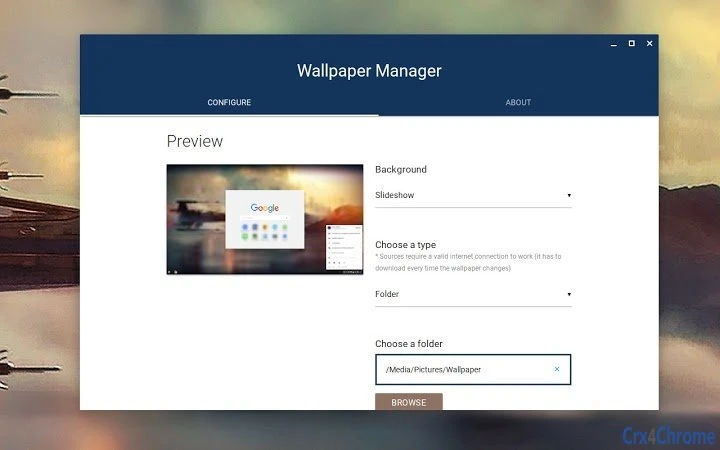
- Drive Folder Cycling – The app allows automatic rotation of wallpapers from a designated folder in Google Drive, enabling users to maintain a dynamic and evolving desktop environment.
- Preset Image Feeds – Built-in feeds provide access to curated collections of images, allowing users to explore diverse themes and styles without manual downloads.
- Subreddit Integration – Version 1.2.5 introduces the ability to pull wallpapers from user-specified subreddits, expanding the source of visual content for users who enjoy community-driven imagery.
- Customizable Display Settings – Users can adjust how images are displayed, including new title fit types, ensuring images are properly aligned and presented on screen.
These features enable users to create a personalized desktop experience. For example, a student might cycle through Drive-stored study-themed images to stay motivated, while a creative professional could use subreddit feeds to showcase their artistic interests. The app empowers users to break free from the default wallpaper limitations and take full control of their visual environment.
User Interface, Workflow & Performance
The user interface of Wallpaper Manager is designed for simplicity and direct access to core functions. Navigation is streamlined, allowing users to quickly select wallpaper sources, adjust settings, and apply changes without unnecessary steps. The layout is intuitive, with clearly labeled options and a consistent design language that aligns with Chrome OS standards.
Workflow efficiency is a key strength. Users can set up automated wallpaper cycles with minimal configuration. Once configured, the app runs in the background, applying changes according to the selected schedule. The app does not require constant user input, making it ideal for hands-off customization.
The developer did not specify resource usage details. However, based on its 1.4 MB file size and focus on a single function, it is expected to have minimal impact on system performance. No reports of instability or crashes were mentioned. General software behavior suggests it operates reliably within Chrome OS constraints, maintaining stability during background operations.
Compatibility & System Requirements
Wallpaper Manager is explicitly designed for Chrome OS, ensuring full compatibility with all devices running the operating system. It does not support Windows, Mac, or other platforms. The app is available as a Chrome Web Store extension and is optimized for Chromebook hardware.
Installation size is 1.4 MB, which is compact and suitable for devices with limited storage. The software version is 1.2.5, released on June 12, 2024. Exact system requirements were not listed, but given its lightweight nature and Chrome OS focus, it is likely to run efficiently on most modern Chromebooks.
Platform compatibility information is limited to Chrome OS. No additional OS support was indicated. Users should ensure their device is running a supported version of Chrome OS to use the app effectively.
Pros and Cons
Pros
- Enhanced customization beyond the default Chrome OS wallpaper app
- Supports solid colors, Drive folders, and external feeds
- Subreddit integration for dynamic, community-sourced content
- Lightweight at 1.4 MB with minimal system impact
- Free to download and use with no hidden costs
Cons
- Exclusive to Chrome OS; not available on other platforms
- Requires Google Drive access for folder cycling
- No built-in image download or editing tools
- Dependency on third-party feeds may affect content availability
- Limited to wallpaper management—no additional utility functions
FAQ Section
Is Wallpaper Manager compatible with all Chromebooks?
The app is designed for Chrome OS, but compatibility may vary depending on the device’s Chrome OS version and hardware capabilities. Users should ensure their Chromebook is running a supported version of the operating system.
Can I use this app without a Google account?
Yes, but certain features like Drive folder cycling require access to a Google account. The app functions with basic settings without an account, but full functionality depends on Google services.
Is the app safe to install?
As a Chrome Web Store extension, Wallpaper Manager is subject to Google’s security review process. It operates within Chrome OS’s sandboxed environment, minimizing risks to system integrity.
How often can I update my wallpaper?
Users can set the app to cycle through images at custom intervals, ranging from minutes to hours, depending on preference and settings.
Does the app work offline?
Basic functionality is available offline, but features like Drive folder access and subreddit feeds require an active internet connection to retrieve content.
Final Thoughts
Wallpaper Manager for Chrome OS delivers a significant upgrade over the default wallpaper app, offering powerful customization options in a lightweight, user-friendly package. Its ability to cycle through Drive folders, pull from preset feeds, and integrate with subreddits makes it a standout utility for Chromebook users who value personalization. While limited to Chrome OS, its focus on a single, well-executed function ensures reliability and performance.
For anyone frustrated by the static nature of the default wallpaper, this tool provides a clear solution. It’s ideal for students, creatives, and tech enthusiasts seeking a more dynamic and expressive desktop environment. The free pricing model adds further appeal, making it accessible to all users.
Download Wallpaper Manager for Chrome OS now to take full control of your desktop experience.
Guides & Tutorials for Better Wallpaper Manager App for Chrome
How to install Better Wallpaper Manager App for Chrome
- Click the Preview / Download button above.
- Once redirected, accept the terms and click Install.
- Wait for the Better Wallpaper Manager App for Chrome download to finish on your device.
How to use Better Wallpaper Manager App for Chrome
This software is primarily used for its core features described above. Open the app after installation to explore its capabilities.
User Reviews for Better Wallpaper Manager App for Chrome 0
No reviews found





